
Your website is your most important digital asset as a small business owner. It runs 24 hours a day, makes first impressions on potential customers, and — when built correctly — converts curious visitors into paying clients. But a slow, outdated, or hard-to-navigate site can actively hurt your business, sending people straight to a competitor before they’ve even seen what you offer. These six small business website tips will help you build an online presence that works as hard as you do.
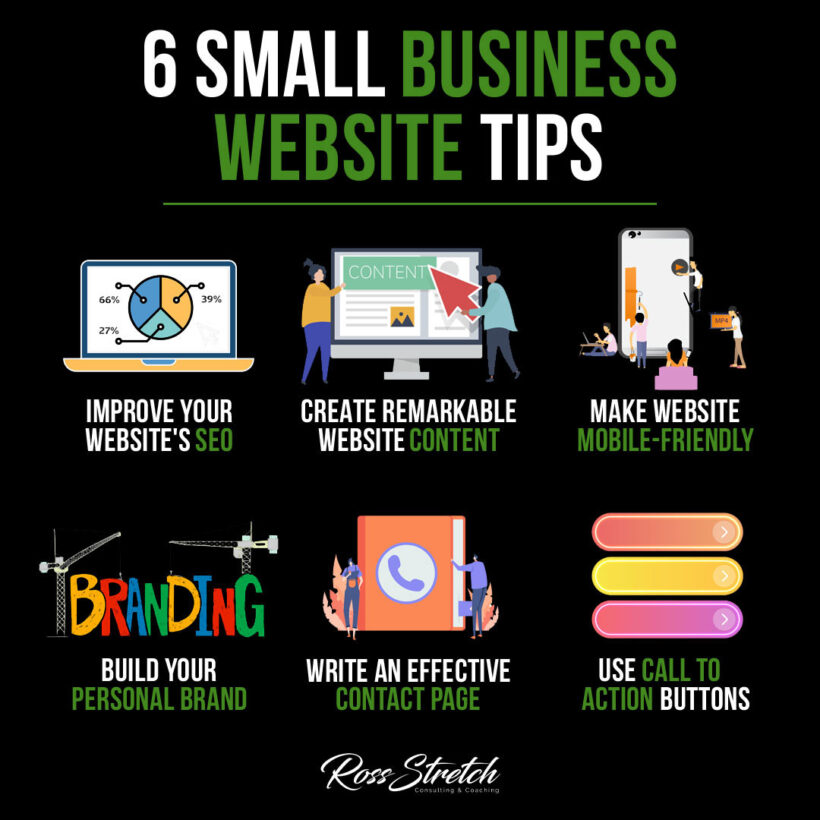
1. Improve Your Website’s SEO
Get Found Before Your Competitors Do
Search Engine Optimization is the difference between a website that generates leads on autopilot and one that nobody ever finds. For small businesses, local SEO is especially powerful — showing up in Google searches like “accountant near me” or “best coffee shop in [your city]” can drive consistent inquiries without paying for ads. Start with the basics: research the keywords your ideal customers are actually searching for, add those terms naturally into your page titles, headings, and content, and make sure your site loads quickly. Google rewards speed, relevance, and authority.
- Actionable Tip: Set up a free Google Business Profile and ensure your site’s name, address, and phone number match exactly across every online directory where your business is listed.
- Why It Works: Consistent business information is a local SEO ranking signal — inconsistencies confuse search engines and push you further down the results page.
Pro Tip:
Use Google Search Console (free) to see which keywords are already bringing people to your site, then create more content around those topics. Double down on what’s already working before chasing new keywords you haven’t yet earned rankings for.
2. Create Remarkable Website Content
Position Yourself as the Expert in Your Field
High-quality content is the engine that drives organic traffic, builds trust, and differentiates your business from competitors offering similar services at similar prices. Publishing helpful blog posts, detailed guides, FAQs, and case studies shows potential customers that you know your industry inside out. It also gives Google more pages to index, which increases the chances of your site appearing in relevant searches. Content doesn’t need to be long to be valuable — it needs to be accurate, genuinely useful, and written with your customer’s actual questions in mind.
- Actionable Tip: Write one piece of content per month that directly answers a question your customers frequently ask. Over a year, that’s 12 pages of targeted, evergreen content working for you around the clock.
- Why It Works: Content that answers real questions attracts people who are actively looking for what you offer — meaning they’re already warm leads by the time they land on your site.
Pro Tip:
Go back and update older content regularly. Adding new data, current examples, or fresh links signals to Google that your page is still relevant, which can improve your rankings without writing anything from scratch.
3. Make Your Website Mobile-Friendly
Meet Your Customers Where They Are
More than 60 percent of web traffic now comes from mobile devices, and Google uses mobile-first indexing — meaning it evaluates the mobile version of your site when determining your search ranking. If your website looks broken on a smartphone or forces users to pinch and zoom to read your menu, you’re losing business every single day. A responsive website automatically adjusts its layout to fit any screen size, ensuring a smooth experience whether a visitor is on a desktop, tablet, or phone.
- Actionable Tip: Test your site using Google’s free Mobile-Friendly Test tool and address every issue it flags before making any other changes to your site.
- Why It Works: A poor mobile experience is one of the top reasons visitors leave a site immediately — fixing it reduces your bounce rate and keeps potential customers engaged long enough to convert.
Pro Tip:
After making your site mobile-friendly, test it on multiple physical devices — an iPhone, an Android, and a tablet — because different screen sizes reveal layout issues that automated tools sometimes miss entirely.
4. Build a Consistent Personal Brand
Make Every Page Feel Like You
Your website’s design, tone, and messaging should tell a consistent story from the moment someone lands on the homepage to the moment they hit the contact button. Inconsistent branding — mismatched colors, different fonts on every page, a formal “About” section paired with a casual homepage — creates confusion and quietly erodes trust. Strong branding means a visitor should be able to recognize your business across every page without needing to see your logo. This includes your writing voice, your color palette, the style of your photography, and the types of topics you cover.
- Actionable Tip: Create a simple brand guide with your exact brand colors (hex codes), two fonts (one for headings, one for body text), and three to five words that describe your brand’s tone. Apply it consistently across every page.
- Why It Works: Consistent branding builds recognition. The more recognizable your brand is, the more trustworthy it feels — and trust is what ultimately drives purchasing decisions.
Pro Tip:
Your “About” page is often the second-most-visited page on any small business website. Make it personal, genuine, and connected to why you started your business — it’s your best opportunity to turn a curious stranger into a loyal customer.
5. Write an Effective Contact Page
Remove Every Barrier Between You and a New Client
A contact page that’s hard to find, confusing to use, or missing key information is a direct conversion killer. Your contact page should make it effortless for potential clients to reach you — which means offering multiple contact methods, being clear about expected response times, and including your location if you serve a local area. A simple, well-designed contact form that takes under 30 seconds to complete will convert far more visitors than a page that only lists an email address and asks people to copy it manually.
- Actionable Tip: Keep your contact form short — ask for a name, email address, and one open-ended field for their message. Every additional field reduces completion rates significantly.
- Why It Works: Friction is the enemy of conversion. The easier you make it to reach you, the more inquiries you’ll receive from people who would otherwise have quietly clicked away.
Pro Tip:
Add a thank-you page that appears after someone submits your contact form. Use it to set clear expectations about response times and offer a useful next step, such as linking to a popular blog post or a free scheduling tool.
6. Use Clear Call-to-Action Buttons
Tell Visitors Exactly What to Do Next
Every page on your website should guide visitors toward a specific next step. A call-to-action is the bridge between someone browsing your site and someone becoming a customer. Weak or missing CTAs leave visitors with no direction — they read your content, feel vaguely interested, and then leave without doing anything. Strong CTAs use clear, action-driven language such as “Book a Free Call,” “Download the Guide,” or “Get a Quote Today,” and stand out visually with a contrasting button color. Place them above the fold on your homepage and at natural stopping points throughout every other page.
- Actionable Tip: Audit your current website and identify every page that doesn’t have a visible CTA. Add one to each page before making any other changes — it’s the highest-impact fix available in the shortest time.
- Why It Works: Visitors who are given a clear, logical next step are significantly more likely to take it. CTAs remove ambiguity and guide people through your sales process naturally and without pressure.
Pro Tip:
Test different CTA button text using your website platform’s built-in analytics or a tool like Google Optimize. Small wording changes — from “Contact Us” to “Get Your Free Quote” — can produce surprisingly large differences in click rates.
Conclusion
A great small business website isn’t about having the most impressive design — it’s about being easy to find, easy to navigate, and easy to trust. Start with SEO so people can actually discover you, then focus on content, mobile experience, consistent branding, an accessible contact page, and clear calls to action. These six improvements compound over time: each one makes the next one more effective. Implement them consistently and your website becomes one of your most powerful and cost-efficient business tools.
Resources
- Google Search Console — Free tool for tracking your site’s search performance and identifying technical SEO issues.
- Moz’s Beginner’s Guide to SEO — Comprehensive, free resource for learning search optimization fundamentals.
- Google Mobile-Friendly Test — Instantly check whether your site passes Google’s mobile usability standards.
- HubSpot Blog Topic Generator — Free tool for generating content ideas based on your industry keywords.
- Typeform — User-friendly contact form and survey builder designed for small business websites.


 Ross Stretch