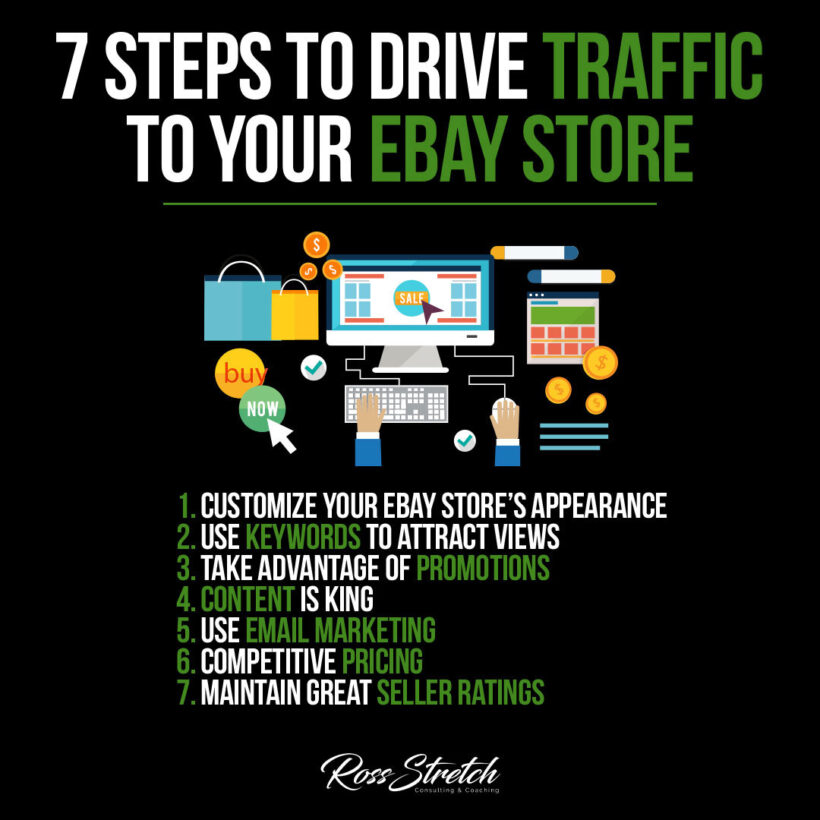

With hundreds of millions of active buyers, eBay remains one of the most powerful platforms for online sellers. But visibility isn’t guaranteed — the marketplace is crowded, and standing out requires a smart, consistent approach. Whether you’re just getting started or looking to scale an existing store, attracting more visitors comes down to search optimization, strong presentation, and building a reputation that makes buyers choose you over the competition. These seven steps give you a clear, actionable playbook to grow your traffic and convert it into sales.
1. Create a Professional and Inviting Store Design
First impressions happen before a buyer reads a single word
Your eBay store’s visual appearance sets the tone for every buyer who lands on it. A professional, well-organized storefront signals that you’re a serious seller who cares about quality — and that trust translates directly into purchases. Buyers who feel confident in your store’s professionalism are more likely to browse additional listings, return for future purchases, and leave positive reviews. A cluttered or generic-looking store, by contrast, creates doubt before the buyer even sees your products.
- Actionable Tip: Upload a custom banner and a clear, recognizable logo to your eBay store. Organize your items into clearly labeled categories and write a compelling store description that explains who you are, what you sell, and why buyers should choose you over other sellers.
- Why It Works: A branded storefront creates a cohesive experience that feels more like a real business than a random seller page. This credibility factor is one of the key reasons buyers click “Add to Cart” without second-guessing, especially from sellers they haven’t purchased from before.
Pro Tip:
Study the top sellers in your category and take notes on their store layouts. You don’t need to copy them — but understanding what a professional benchmark looks like in your niche helps you close the gap quickly. eBay’s Seller Center has free templates and guidance to help you build a polished storefront in under an hour.
2. Optimize Your Listings with the Right Keywords
Buyers can’t purchase what they can’t find
eBay’s search engine — called Cassini — determines which listings appear when a buyer searches for a product. Like Google, it prioritizes listings that match what the buyer is searching for. If your titles and descriptions don’t include the words real buyers use, your listings won’t appear no matter how good your product or price is. Effective keyword optimization is the single highest-leverage action most eBay sellers can take to increase their organic traffic immediately and at no cost.
- Actionable Tip: Search for your product on eBay and note the exact words used in the top-performing listings. Use those phrases in your title, item specifics, and description. The free Terapeak tool inside eBay Seller Hub shows you the exact search terms buyers use and what those items actually sell for.
- Why It Works: Matching your language to buyer search behavior removes the gap between your listing and the people looking for it. Better keyword alignment means higher placement in search results, which means more views — and more sales — without spending a dollar on advertising.
Pro Tip:
Fill out every item specific eBay offers for your category. These fields — brand, size, condition, model number — are used to filter search results. Incomplete specifics result in your listing being excluded from filtered searches, which can eliminate a significant portion of qualified buyers who would have purchased.
3. Run Strategic Promotions to Drive Traffic
Buyers love a deal — give them a reason to choose you
Promotions don’t just attract price-sensitive shoppers — they actively boost your listing’s visibility within eBay’s platform. eBay favors sellers who use its Promotions Manager tool, giving their items higher placement in search results and inclusion in promotional emails sent to relevant buyers. A well-timed sale, a bundle deal, or a volume discount can simultaneously increase your click-through rate and your average order value — a rare win on both fronts.
- Actionable Tip: Use eBay’s Promotions Manager to set up a “Buy More, Save More” offer across your listings. Even a 10% discount on orders of two or more items can meaningfully increase your average transaction value while improving your visibility in search results.
- Why It Works: Promotions trigger eBay’s algorithm to surface your listings more frequently in search results and in promotional emails sent to buyers who’ve shown interest in similar products. You earn more visibility as a direct result of running the promotion, at no additional cost beyond the discount.
Pro Tip:
Time your promotions around peak shopping periods — holidays, back-to-school season, and long weekends. Buyers are already in buying mode during these windows, and a well-placed promotion can dramatically outperform the same discount run during a slower period of the year.
4. Write Clear, Compelling Product Descriptions
Your description is your silent salesperson
Most eBay sellers underinvest in their product descriptions — and it costs them sales every single day. A good description does three things: it answers the buyer’s most pressing questions before they have to ask, it builds confidence in the product’s quality and condition, and it includes relevant keywords that improve search visibility. On a platform where buyers can’t touch or try a product before purchasing, your words and photos are everything. Make them count.
- Actionable Tip: Structure each description with a brief overview of the item, a bulleted list of key features and specifications, honest condition details — including any wear or defects — and clear shipping information. Use high-resolution photos taken from multiple angles, including close-ups of any notable features or condition issues.
- Why It Works: Comprehensive descriptions reduce buyer hesitation, decrease the number of questions you have to answer, and cut return rates. All three outcomes save you time and protect your seller performance metrics — which eBay uses to determine how prominently your listings appear in search.
Pro Tip:
Use natural light for your product photos whenever possible. eBay’s own data shows that listings with clear, well-lit photos significantly outperform those with dark or blurry images. A simple lightbox setup — available for under $30 online — can dramatically improve your photo quality overnight and immediately increase conversion rates.
5. Use Email Marketing to Bring Back Past Buyers
Your best prospect is someone who already bought from you
Acquiring a new customer costs five times more than retaining an existing one. eBay sellers who stay connected with past buyers have a built-in advantage: those buyers already trust you. They’ve experienced your shipping speed, your packaging quality, and your communication style. A well-timed message announcing new inventory or an exclusive promotion gives them a reason to return — and returning customers convert at much higher rates than first-time visitors browsing cold.
- Actionable Tip: Use eBay’s built-in marketing email tools inside Seller Hub to send newsletters to your store’s followers. Announce new arrivals, upcoming sales, or curated collections relevant to past purchases. Keep emails short, visually clean, and focused on value — not just promotion.
- Why It Works: Repeat buyers spend more per transaction and are significantly more likely to leave positive feedback. They also refer others. A small investment in maintaining those relationships creates a disproportionate return through loyalty, repeat purchases, and word-of-mouth referrals.
Pro Tip:
Encourage every buyer to follow your store by including a brief insert card with your shipments that says something like: “Follow our eBay store for exclusive deals and first access to new arrivals.” This organically grows your follower list with people who are already interested in what you sell.
6. Set Competitive, Research-Backed Prices
Price right — not just low
Pricing on eBay is both art and science. Going too low destroys your margin and attracts bargain hunters who may be difficult to satisfy. Going too high loses you to competitors offering comparable value. The goal is to price based on real market data — not guesses or gut feelings. Understanding what buyers actually paid for items like yours is the key distinction that separates strategic sellers from those who wonder why their listings don’t move.
- Actionable Tip: Use eBay’s “Sold Listings” filter to see what buyers actually paid for similar items in the last 90 days. Price your item in the upper-mid range of those results, then offer free shipping to make your total price competitive without appearing cheap or desperate.
- Why It Works: Free shipping is one of the most significant conversion drivers on eBay. Buyers overwhelmingly prefer seeing the full cost upfront rather than encountering a shipping charge at checkout — and eBay gives listings with free shipping preferential treatment in search results.
Pro Tip:
Terapeak, available inside Seller Hub at no additional cost, provides detailed sold data, average selling prices, and sell-through rates for any category. Use it monthly to ensure your pricing stays aligned with market conditions as supply and demand shift throughout the year.
7. Build and Protect Your Seller Feedback Rating
Trust is your most valuable competitive advantage on eBay
On a marketplace where buyers can’t physically inspect items before purchasing, feedback scores are the closest thing to a recommendation from a trusted friend. A high positive feedback rating — ideally above 99% — signals to buyers that hundreds or thousands of people have had a good experience with you. This removes purchase hesitation and consistently outperforms every other factor in driving conversion. A single unresolved issue can cost you sales for months, so protecting your rating deserves the same attention as your listings.
- Actionable Tip: Respond to all buyer messages within 24 hours. Ship within your stated handling time, every time. When problems arise — and they will — resolve them quickly and generously. Refunding a $15 item without argument is worth far more than the money if it protects your rating and avoids a negative review.
- Why It Works: eBay’s algorithm rewards top-rated sellers with higher search placement, lower final value fees, and a visible badge that builds immediate buyer confidence. The better your performance metrics, the more eBay promotes your listings — it’s a compounding advantage that grows over time.
Pro Tip:
After each successful transaction, send a brief follow-up message thanking the buyer and letting them know they can contact you directly with any questions about their purchase. This simple touchpoint increases positive feedback rates and often catches dissatisfied buyers before they leave a negative review — giving you the chance to resolve the issue privately.
Conclusion
Growing your eBay store’s traffic isn’t about gaming the system — it’s about executing the fundamentals better than the average seller. A professional storefront, smart keyword use, strategic pricing, and an obsessive focus on customer satisfaction compound over time into a store that eBay’s algorithm actively promotes. Start by tackling two or three of these steps this week, and build from there. Consistent improvement, not perfection, is what creates lasting growth on eBay.
Resources
- eBay Seller Hub — Your central dashboard for managing listings, promotions, orders, and performance analytics.
- eBay Promotions Manager — Set up discounts, bundle deals, and volume pricing to drive traffic and increase average order value.
- WebRetailer: eBay SEO Guide — In-depth guide to optimizing your listings for eBay’s Cassini search algorithm.
- eBay Seller News — Stay current on platform updates, fee changes, and new tools that affect your store’s performance.


 Ross Stretch